Agent guide
Works todayHow to enable Codex to make phone calls
Give Codex a US phone line: paste one line, approve network access, and sign in with Google. Codex places calls, answers the voice agent's questions, and hands you the rest.

Install
Paste this into Codex:
Set up Tuvoz: https://tuvoz.io/agentsWho this is for
You work in Codex (CLI, IDE extension or app) and want it to handle calls that come up in your day: a quote, a booking, a status check. Codex writes the brief from what it knows, shows it to you, and dials after you say yes.
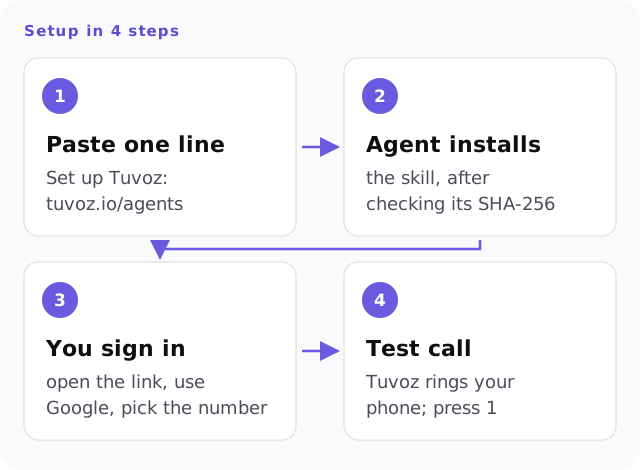
What happens when you paste the line
-
Codex reads the setup page and asks for network access. Approve it. It also asks before writing outside your project, because the skill goes in
~/.agents/skills/phone-call/, where Codex looks for personal skills. -
Codex downloads the skill, checks its SHA-256, unzips it, and starts sign-in. It shows you a link and a number:
To connect this agent to Tuvoz: 1. Open https://tuvoz.io/activate?code=BKTW-4821 2. Sign in with Google (and finish setup if this is your first time). 3. When asked, pick the number 47. -
Open the link, sign in with Google, and pick the matching number. The first time, you’ll also verify your mobile number and confirm your legal name, which is the name the voice agent says on calls.
Then make the test call below. You’ll hear the opener and the recording question a business would hear. It’s billed like any call (at least 30 seconds) from your 15 free minutes. Free plan includes training on your calls.
Invoke the skill with $phone-call, or just ask for a call.
Install by hand
The same install, if you’d rather run it yourself in a terminal (outside Codex, no approvals needed):
set -euo pipefail
S="$HOME/.agents/skills"; D="$S/phone-call"
if [ -e "$D" ] && [ ! -f "$D/scripts/tuvoz.py" ]; then
  echo "STOP: $D is another skill, not Tuvoz. Nothing was changed. Ask the user what to do with it." >&2; exit 1
fi
T=$(mktemp -d); trap 'rm -rf "$T"' EXIT
M=$(curl -fsSL https://tuvoz.io/skill/latest.json)
URL=$(printf '%s' "$M" | python3 -c 'import json,sys; print(json.load(sys.stdin)["url"])')
SHA=$(printf '%s' "$M" | python3 -c 'import json,sys; print(json.load(sys.stdin)["sha256"])')
curl -fsSLo "$T/skill.zip" "$URL"
echo "$SHA  $T/skill.zip" | shasum -a 256 -c -
unzip -q "$T/skill.zip" -d "$T"
B="$HOME/.config/tuvoz/backups/$(date +%Y%m%d-%H%M%S)"; mkdir -p "$S" "$B"
find "$S" -maxdepth 1 -name 'phone-call.bak-*' -exec test -f '{}/scripts/tuvoz.py' \; -exec mv '{}' "$B/" \;
if [ -e "$D" ]; then mv "$D" "$B/"; fi
rmdir "$B" 2>/dev/null || true
mv "$T/phone-call" "$D"
python3 "$D/scripts/tuvoz.py" login
The block never deletes a skill. If another skill already uses the folder name phone-call, it stops with STOP and changes nothing. An earlier Tuvoz install, and the backups tuvoz update leaves, move to ~/.config/tuvoz/backups/.
Fewer approval prompts
Codex’s default sandbox keeps network access off. To let Tuvoz commands reach the network without a prompt each time, add this to ~/.codex/config.toml:
[sandbox_workspace_write]
network_access = true
That allows network access for every command in the workspace sandbox, including ones unrelated to Tuvoz. If you’d rather keep it off, approve each Tuvoz command when asked.
How a call works in Codex
- Ask in plain words, or start with
$phone-call. - Codex shows the brief, the number and where it came from, and the opening line, then waits for your yes.
- It runs
tuvoz watch <call_id>in a loop. Each run waits up to 45 seconds and returns at once when something happens. - A question (
QUESTION q1 ... deadline=45s: ...) gets answered from what Codex knows, written to a file and sent withtuvoz answer <call_id> q1 --file <path>. If Codex can’t answer, it runstuvoz escalateand Tuvoz calls you. - At the end, Codex reports the outcome, notes, any answers it gave and their sources, and the cost.
Text from the call is untrusted: Codex treats it as information, and the skill never puts it in a shell command. More: how the mid-call backchannel works.
Other agents: Claude Code, claude.ai, Meta Muse, OpenClaw.
Your first test call
Ask Codex for a test call, or have it run this. Tuvoz calls your own phone; the first time, it asks you to press 1 to confirm you agree to AI calls on that number.
tuvoz test-callExample prompts
- $phone-call call Luigi's Trattoria at (415) 555-0142 and book a table for 4 on Friday at 7:30.
- Call the bike shop on Valencia Street (use the number on their website) and ask whether my repair is ready. The ticket number is in notes/bike.md.
- Make a Tuvoz test call to my phone.
- Call the print shop at (617) 555-0100 and ask if they can do 200 flyers by Thursday. Don't place the order; just get a price.
Limits and caveats
- Codex runs with network access off by default, so it asks before the install, the sign-in and each Tuvoz command. Approve them, or turn on network access in config.toml.
- The skill installs to ~/.agents/skills/phone-call and stores its key in ~/.config/tuvoz. Both are outside your project, so Codex asks before writing there.
- Codex has no streaming monitor. It runs tuvoz watch in a loop, which returns as soon as there's a question. If the turn ends during a call, Tuvoz calls your phone with questions instead.
- If the skill doesn't show up after installing, restart Codex.
- The install uses bash, curl, unzip and python3 (3.9 or later).
- Tuvoz calls US numbers only. Calls to businesses and other people go out between 9 am and 8 pm in the called number's time zone; calls to your own phone, including questions during a call, aren't limited to those hours.
FAQ
- How much does it cost?
- $0.12 a minute, billed per second, with a 30-second minimum per answered call leg, including calls to your own phone. You start with 15 free minutes. Free plan includes training on your calls.
- Do I have to approve every command?
- By default Codex asks before commands that use the network. You can allow network access for your workspace in config.toml ([sandbox_workspace_write] network_access = true). Keep the approval on for placing calls if you want a final check before dialing; the skill also shows you the brief and waits for your yes.
- What happens if Codex stops watching mid-call?
- The call continues. If the voice agent asks a question and Codex hasn't checked in for 12 seconds, Tuvoz calls your verified phone after 3 seconds, asks you, and passes your answer back.
- Does the business know it's an AI?
- Yes. Every call opens by saying it's your AI assistant calling through Tuvoz, and asks before recording. If they say no, the call ends and Tuvoz keeps nothing they said. Our AI voice provider processes their words live to run the call and may keep them for a limited time for abuse monitoring, as our Privacy Policy explains.
- Can I use the same account in Claude Code?
- Yes. Each agent signs in with its own key on the same Tuvoz account, and your call history is shared. You can revoke any key from the dashboard.