Agent guide
Works todayHow to enable Meta Muse to make phone calls
Add Tuvoz to Meta Muse as a custom service: paste one line, sign in on your own phone, and Muse can place calls to US businesses, answer the voice agent's questions, and hand you anything it can't.
Install
Paste this into Meta Muse:
Set up Tuvoz: https://tuvoz.io/agentsWho this is for
You use Meta Muse on your phone and want it to call businesses for you, with you in the loop when it gets stuck. Muse can add services from an OpenAPI document and keep their keys in its Secure Credentials Store, so Tuvoz plugs in as a custom service you set up in chat.
What happens when you paste the line
-
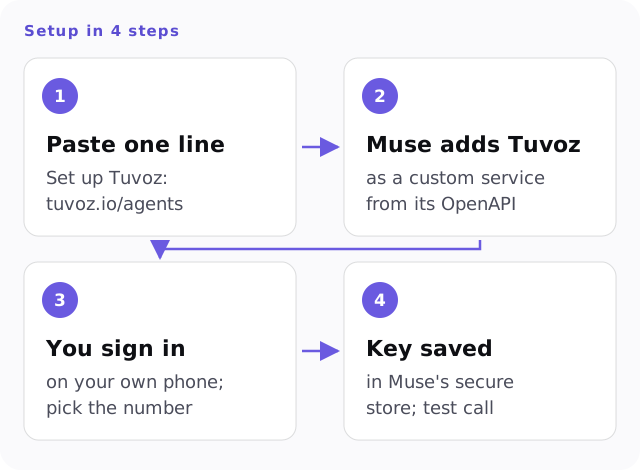
Muse reads the setup page and adds Tuvoz as a custom service, using the base URL
https://api.tuvoz.ioand the OpenAPI document athttps://api.tuvoz.io/v1/openapi.json. Approve it when Muse asks. -
Muse starts sign-in and shows you a link and a number, like this:
To connect this agent to Tuvoz: 1. Open https://tuvoz.io/activate?code=BKTW-4821 2. Sign in with Google (and finish setup if this is your first time). 3. When asked, pick the number 47. -
Open the link on your own phone or computer, sign in with Google, and pick the matching number. The first time, you’ll also verify your mobile number and confirm your legal name, which is the name the voice agent says on calls.
-
Muse saves the Tuvoz key in its Secure Credentials Store. Nothing to paste.
Then ask Muse for a test call to your phone. You’ll hear the opener and the recording question a business would hear. It’s billed like any call (at least 30 seconds) from your 15 free minutes. Free plan includes training on your calls.
How a call works in Muse
- Ask for the call. Muse writes the brief and shows it to you with the number and where it came from. It dials only after you say yes.
- Muse checks the call for news in requests of up to 15 seconds each.
- When the voice agent asks a question, Muse answers from what it knows, or asks Tuvoz to call you.
- When the call ends, Muse tells you the outcome and what was agreed.
If Muse stops checking (you leave the app, the task ends), Tuvoz notices within 12 seconds and calls your phone with any question. More: how the mid-call backchannel works.
Other agents: Claude Code, Codex, claude.ai, OpenClaw.
Your first test call
Ask Meta Muse for a test call, or have it run this. Tuvoz calls your own phone; the first time, it asks you to press 1 to confirm you agree to AI calls on that number.
tuvoz test-callExample prompts
- Set up Tuvoz: https://tuvoz.io/agents
- Use Tuvoz to call Luigi's Trattoria at (415) 555-0142 and book a table for 2 on Saturday at 7.
- Call the salon at (206) 555-0177 and ask for the earliest haircut appointment next week. Ask me before you accept a time.
- Make a Tuvoz test call to my phone.
Limits and caveats
- Muse talks to Tuvoz's API directly instead of running a script. It checks the call in requests of 15 seconds or less, so answers to mid-call questions can take a few seconds longer than in Claude Code.
- Open the sign-in link on your own phone or computer, not in Muse's browser. Google sign-in may not work inside an agent's cloud browser.
- Enter the Tuvoz key only through Muse's secure credential prompt, never in the chat.
- Meta doesn't review custom services. Check that the service points to https://api.tuvoz.io before you approve it.
- Muse asks before write actions. Approving Tuvoz's answer action for the whole task keeps mid-call answers from waiting on a tap; keep placing calls on per-call approval.
- Muse is testing its own business calling. See the comparison for how the two differ.
- Tuvoz calls US numbers only. Calls to businesses and other people go out between 9 am and 8 pm in the called number's time zone; calls to your own phone, including questions during a call, aren't limited to those hours.
FAQ
- Doesn't Muse already make phone calls?
- Meta is testing its own calling to US businesses, with limited access as of Oct 8, 2026. Tuvoz works in Muse today, says exactly who's calling and asks before recording, and the same account works in Claude Code, Codex and claude.ai.
- How much does it cost?
- $0.12 a minute, billed per second, with a 30-second minimum per answered call leg, including calls to your own phone. You start with 15 free minutes. Free plan includes training on your calls. Tuvoz bills separately from your Muse plan.
- Where does Muse keep my Tuvoz key?
- In Muse's Secure Credentials Store, outside the chat. You can revoke the key any time from the Tuvoz dashboard.
- What if Muse doesn't answer a question in time?
- Tuvoz calls your verified phone, asks you, and passes your answer back into the call.
- Does the business know it's an AI?
- Yes. Every call opens by saying it's your AI assistant calling through Tuvoz, and asks before recording. If they say no, the call ends and Tuvoz keeps nothing they said. Our AI voice provider processes their words live to run the call and may keep them for a limited time for abuse monitoring, as our Privacy Policy explains.